
Features / Payroll Management

Payroll workflows, connected from attendance to payroll.

Bring employee data, approved attendance, payroll review, payslips and reports together in 1pay.

Book a Demo →

One workflow for the payroll cycle

Employee information

Keep payroll-related employee records connected to attendance and payroll.

Attendance to payroll

Use reviewed attendance, overnight shifts, overtime, and holidays as relevant payroll inputs.

Payroll processing and approvals

Prepare and review payroll runs using the desktop workspace.

Payslips and reports

Make payroll records available for employee access and administrative review.

Employee payslips

A clearer view of every payday.

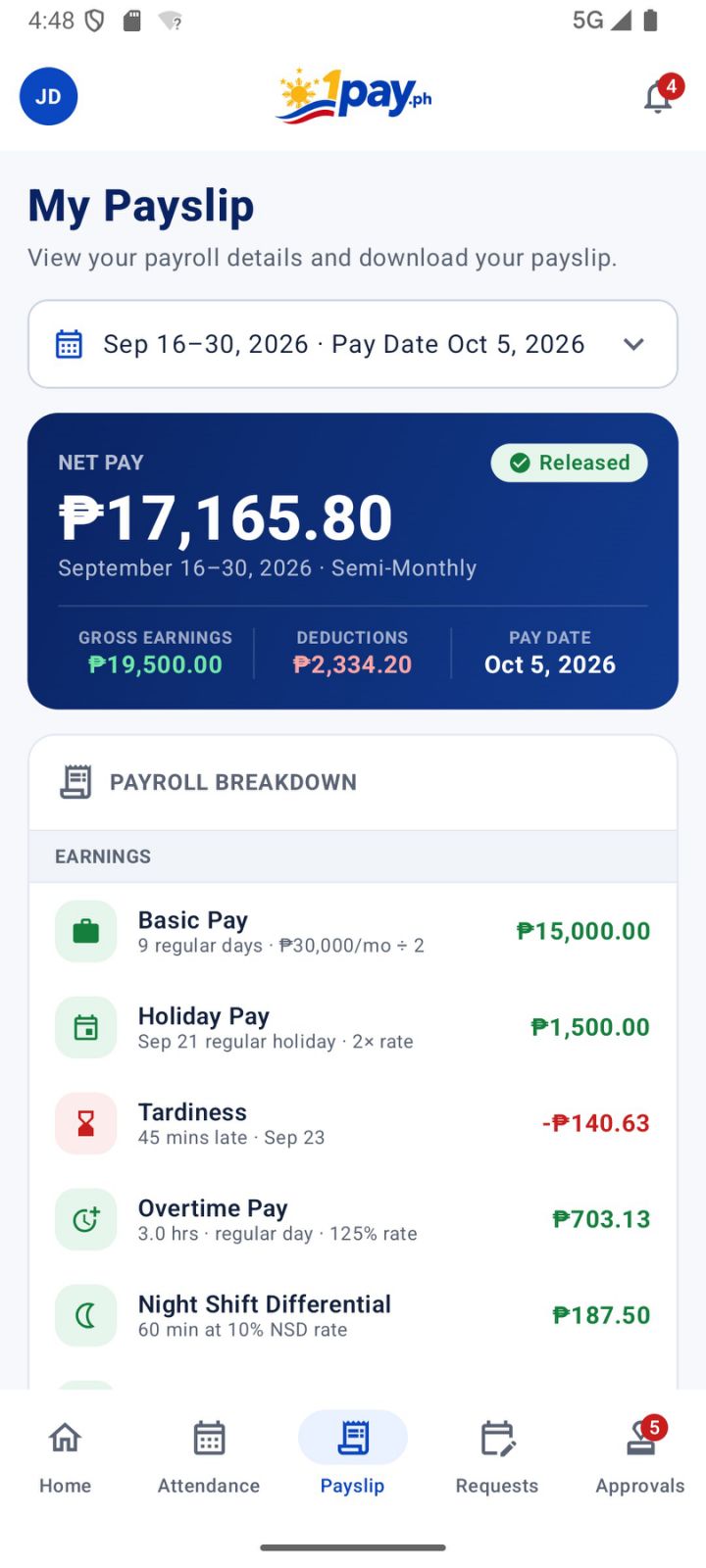
See detailed payroll information on desktop and a clear, easy-to-navigate payslip experience in the 1pay mobile app.
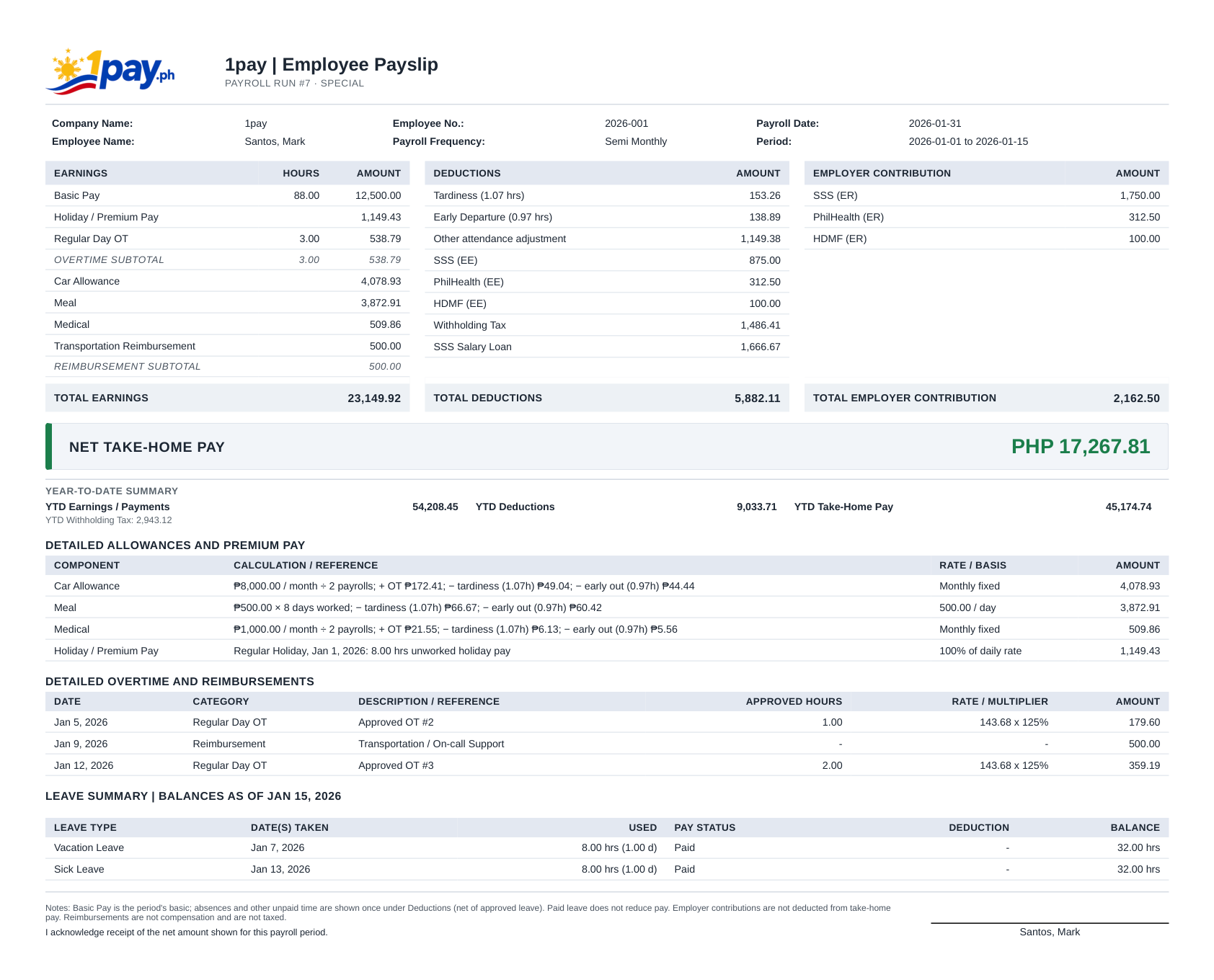
1pay sample employee payslip, showing earnings, deductions, employer contributions and net take-home pay
Actual 1pay mobile app My Payslip screen with net pay, pay date, gross earnings, deductions and payroll breakdown
Detailed pay breakdownDesktop and mobile viewingPhilippine payroll information

Desktop and mobile screenshots show different sample payroll periods and amounts.

How 1pay fits into payroll preparation

Capture and review work records
Verify salary and payroll inputs
Review the payroll run
Complete approval and processing
Access payslips and reports

Prefer a team to handle processing?

1pay also offers a separate Managed Payroll Services option for companies that want hands-on support.

Explore Managed Payroll →
A closer look

Inside the payroll workflow

Payroll is often difficult because data arrives from different systems and people. 1pay connects employee information, attendance, requests, configured pay rules, payroll processing, payslips, and reports into one operating workflow.

01 / FEATURE DETAIL

Set up employee payroll information

Maintain essential employee details in the 201 File and payroll information areas. Configuration includes employment types, payroll groups, banks, pay periods, fixed allowances, earnings, deductions, and loan types.

02 / FEATURE DETAIL

Bring approved inputs into the run

Attendance, shifts, leave, overtime, corrections, and other approved requests affect payroll preparation. Teams can review these source records rather than calculating from isolated chats and spreadsheets.

03 / FEATURE DETAIL

Apply Philippine payroll settings

Configure SSS, PhilHealth, Pag-IBIG (HDMF), and BIR withholding tax, together with holiday rates, overtime, night differential, and 13th month pay. 1pay supports different pay periods, including daily, weekly, bi-weekly, monthly, and semi-monthly payroll arrangements, through configurable payroll groups and periods.

04 / FEATURE DETAIL

Validate and finalize outputs

Payroll administrators can inspect payroll-run details and reports, review unusual results, and make authorized corrections before payslips and final outputs are distributed.

05 / PAY PERIODS

Flexible pay periods

Organize payroll with configurable pay periods, including daily, weekly, bi-weekly, monthly, and semi-monthly schedules. Payroll groups help businesses manage employees with different payroll arrangements in the same platform.

Common questions

What teams usually ask

Explore practical answers before scheduling a walkthrough.

Does 1pay support statutory deductions?

Yes. 1pay supports the statutory payroll deductions used in the Philippines: Social Security System (SSS) contributions, PhilHealth contributions, Pag-IBIG Fund (HDMF) contributions, and Bureau of Internal Revenue (BIR) withholding tax on compensation. These are included in payroll setup and calculation workflows.

Does it cover the 13th month?

Yes. 1pay supports 13th month pay, including configuration and processing within the payroll workflow.

Can we export payroll details?

Yes. You can export payroll-run details and other available reports. Visit the Reports section to explore payroll, attendance, leave, government-related, and audit reports. Depending on the report, you can save outputs in XLSX, PDF, and/or HTML formats.

See 1pay in action

Book a Demo

Talk to our team about how 1pay can support your workforce and payroll process.

Email marketing@1pay.ph.