
For many Philippine businesses, Excel is a familiar way to manage payroll. It is flexible, easy to access, and may be practical for businesses with simple payroll requirements. As a company grows, however, payroll can involve more employees, attendance records, overtime, leave, deductions, reports, and employee information. This raises a practical question: when should a business consider dedicated payroll software?
Using Excel for Payroll
Excel can be useful for businesses with relatively simple payroll requirements.
Advantages of Excel
- Familiar and easy to use
- Flexible and customizable
- Relatively inexpensive
- Can work for small businesses with simple payroll processes
Where Excel Payroll Can Become Difficult
As payroll becomes more complex, managing everything through spreadsheets can require more manual work.
1. Manual Data Entry
Employee information, attendance records, salary information, and payroll adjustments may need to be entered or transferred manually.
2. Multiple Files and Spreadsheets
Payroll information may be spread across different files, making it more difficult to maintain one consistent source of information.
3. Formula and Data Errors
Incorrect formulas, overwritten cells, missing information, or inaccurate data entry can affect payroll calculations.
4. Attendance and Payroll Consolidation
Businesses may need additional manual steps to combine attendance, overtime, leave, and payroll information when these are managed separately.
5. Reporting
Creating recurring payroll reports can require additional spreadsheet preparation, particularly when management needs information from different periods or employee groups.
What Is Payroll Software?
Payroll software is designed to help businesses manage payroll-related information and processes through a dedicated system. Depending on the platform, it may include employee information, attendance, payroll processing, requests and approvals, payslips, reporting, and workforce management.
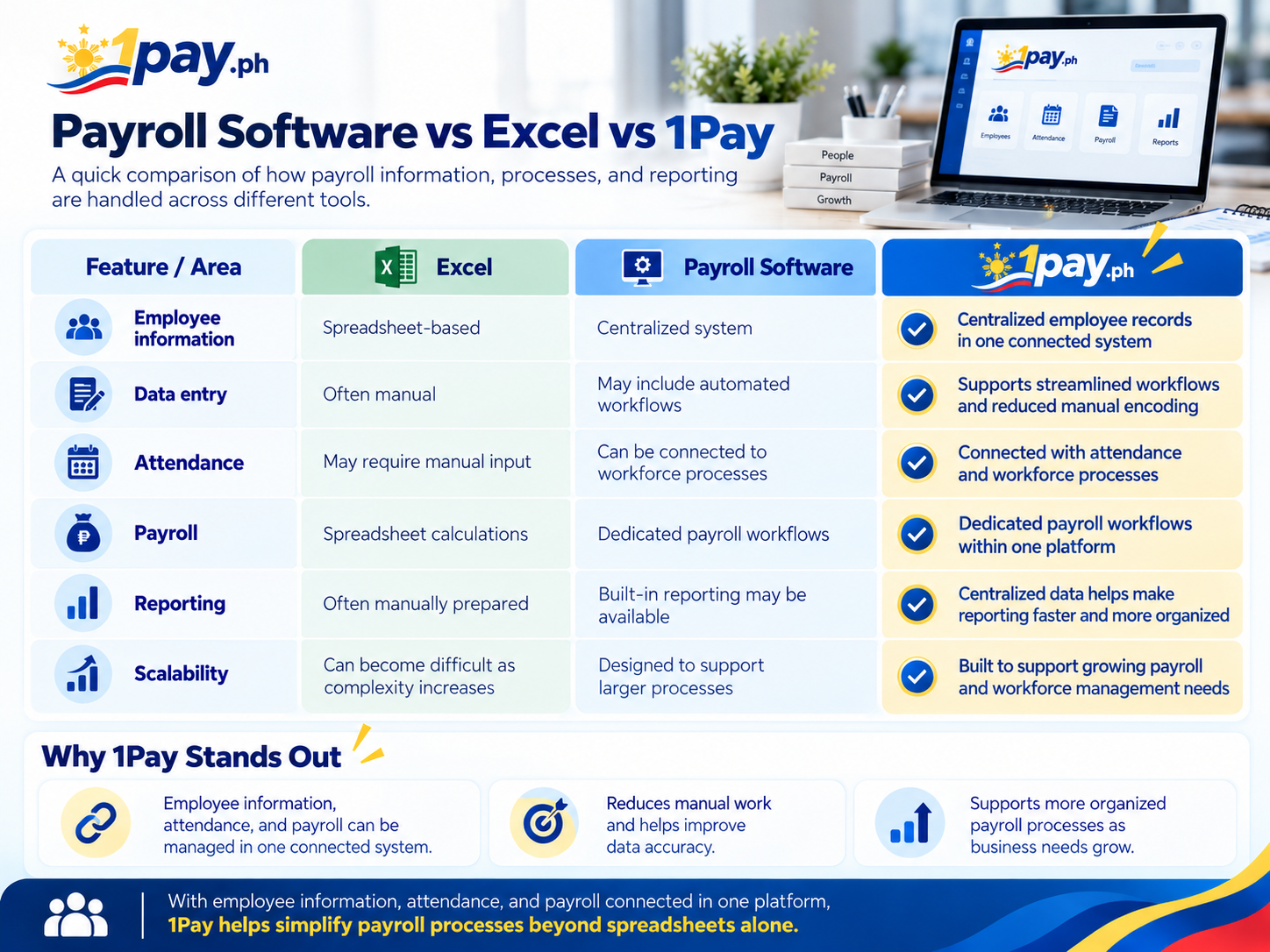
Payroll Software vs. Excel
| Area | Excel | Payroll Software |
|---|---|---|
| Employee information | Spreadsheet-based | Centralized system |
| Data entry | Often manual | May include automated workflows |
| Attendance | May require manual input | Can be connected to workforce processes |
| Payroll | Spreadsheet calculations | Dedicated payroll workflows |
| Reporting | Often manually prepared | Built-in reporting may be available |
| Scalability | Can become difficult as complexity increases | Designed to support larger processes |
The difference is not simply that one tool is better than the other. The more important question is whether the system matches the complexity of the business.
When Should a Business Consider Payroll Software?
A business may want to consider dedicated payroll software when:
- The number of employees is increasing.
- Payroll takes significant time to prepare.
- Multiple people are involved in payroll processing.
- Attendance information needs to be consolidated manually.
- HR and payroll information are stored across different files or systems.
- Management needs more consistent payroll reports.
- Payroll processes are becoming increasingly dependent on manual work.
Is Excel Still Suitable for Small Businesses?
Yes. Excel can still be practical for smaller businesses with relatively simple payroll processes and a manageable number of employees. The key is to regularly evaluate whether the existing process remains efficient as the organization grows.
What Should Businesses Look for in Payroll Software?
Businesses should consider employee information management, attendance, payroll, requests and approvals, reporting, accessibility, scalability, support, implementation, and compatibility with applicable Philippine payroll requirements.
How 1pay Fits In
1pay is designed to bring key employee and payroll processes together in one system, including employee information, attendance, payroll, requests and approvals, and reporting. Its positioning focuses on creating a simpler and more connected payroll and workforce workflow.
Explore 1pay payroll management →Frequently Asked Questions
Is Excel good for payroll?
Excel can be suitable for small businesses with relatively simple payroll requirements. As employee numbers and payroll processes become more complex, businesses may consider dedicated payroll software.
When should a company stop using Excel for payroll?
There is no single employee-count threshold. Businesses should consider switching when manual payroll processes become time-consuming, difficult to maintain, or increasingly prone to errors.
What are the advantages of payroll software?
Payroll software can centralize payroll-related information and connect processes such as employee records, attendance, payroll, requests, approvals, and reporting, depending on the platform.
Is payroll software better than Excel?
It depends on the business. Excel may be sufficient for simple payroll processes, while businesses with more complex or growing payroll requirements may benefit from a dedicated system.
Conclusion
Excel can remain a practical payroll tool for businesses with simple requirements. As a company grows, however, managing employee information, attendance, payroll, requests, and reporting through spreadsheets can become increasingly difficult. For businesses considering a dedicated payroll system, the key question is whether a more connected system can make payroll and workforce processes easier to manage.
1pay is being developed around this idea: a simpler, more connected way to manage payroll and workforce processes.
Make your payroll workflows simpler with 1pay.
Connect attendance, employee information, and payroll in a platform built for Philippine businesses.